
💻 Download and Run LyRuno
Please download only from the official LyRuno website or authorized sources.
Windows
Download and Use LyRuno-MDX
- Download the LyRuno-MDX archive
- Extract the
*.7zfile - Open the
LyRuno-MDXfolder - Double-click
LyRuno-MDX.exeto run
Notes
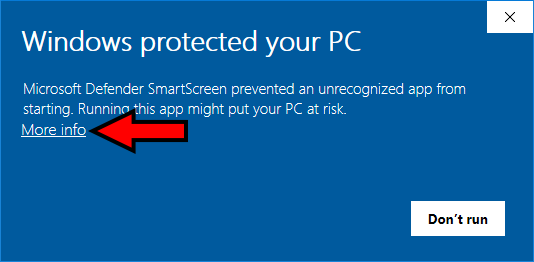
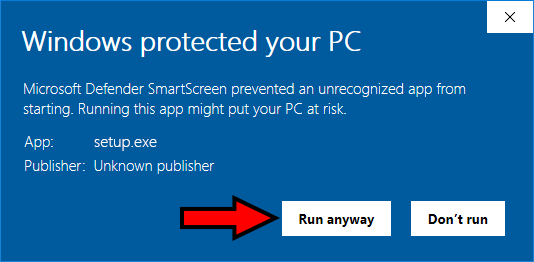
- A Windows SmartScreen warning may appear due to code signing and is not a security risk. You can install the app from the Microsoft Store if preferred.
- To proceed:
- Click More info
- Click Run anyway
- Click More info
MacOS
Download and Use LyRuno-MDX
- Download the LyRuno-MDX dmg
- Drag and drop
LyRuno-MDXto theApplicationsfolder
Notes
- When installing a
.dmgapplication not downloaded from the App Store on macOS, it may be blocked by the system (displaying prompts such as "cannot be opened because the developer cannot be verified", "--.dmg is damaged and can’t be opened.", or "You should move it to the Trash.", etc.). The solution is as follows: - Step 1: Open the Terminal and execute the following command:
bash
sudo xattr -r -d com.apple.quarantine /Applications/LyRuno-MDX.app(Note: This assumes you dragged the app into your Applications folder. Just hit Enter after pasting, and it might ask for your Mac login password. Typing will be hidden, just type it and hit Enter again.)